iPhone Facile : Configurer un compte mail
 Axel David
- Il y a 15 ans (Màj il y a 10 ans)
- 💬 6 coms
- 🔈 Écouter


 Aujourd'hui, nous allons voir comment paramétrer un compte mail non proposé par l'iPhone.
Comme d'habitude sur iPhoneSoft, voici une nouvelle astuce pour les débutants qui vient garnir la section iPhone facile...
Ces petites astuces aident souvent les débutants mais peuvent également parfois surprendre les plus experts d'entre nous !
Pour les débutants, nous vous rappelons que vous pouvez consulter notre lexique pour iPhone, iPod et iPad.
Si vous rencontrez des problèmes ou si vous voulez partager vos expériences, n'hésitez pas à vous diriger vers le forum iPhoneSoft.
Configurer un compte mail proposé par l'iPhone est relativement simple il suffit de suivre les étapes. En revanche si on veut en configurer un non proposé d'origine, cela peut assez vite se transformer en cauchemar ! Aujourd'hui nous allons voir la méthode général et les différents paramètres à renseigner selon votre FAI (Fournisseurs d'Accès Internet).
Première étape : rendez-vous dans Réglages -> Mail, contacts, calendrier -> Ajouter un compte, pour obtenir cette vue :
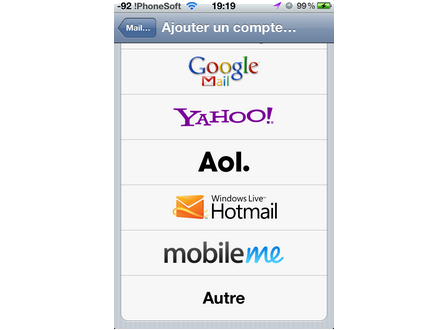
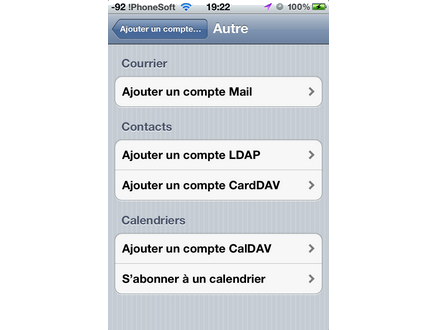
Deuxième étape : cliquez sur Autre et Ajouter un compte mail (si vous êtes en Firmware > iOS 5.0)
Troisième étape : Remplissez les champs
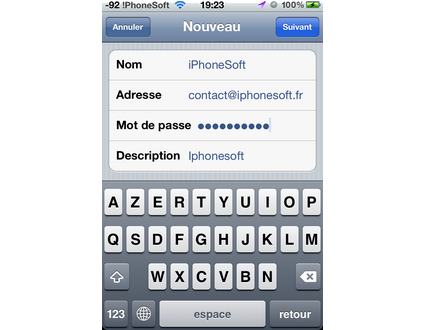
Quatrième étape : l'iPhone vous demande de remplir les champs IMAP ou POP de votre compte. Pour les connaitre vous pouvez soit demander à votre FAI de vous les fournir soit regarder dans la liste qui est en bas de l'article. Votre nom d'utilisateur est votre adresse mail et votre mot de passe, celui que vous utilisez habituellement pour vous connecter à votre boite mail.
Cinquième et dernière étape : choisissez ce que vous souhaitez synchroniser avec votre boite mail. En effet, certains FAI vous propose de synchroniser vos calendriers, vos notes,...
Liste des serveurs POP des différents FAI :
Neuf Telecom
- Serveur POP : pop.neuf.fr
- Serveur SMTP : smtp.neuf.fr
- Serveur IMAP : imap.neuf.fr
9ONLINE
- Serveur POP : pop.9online.fr
- Serveur SMTP : smtp.9online.fr
ALICE ADSL
- Serveur POP : pop.alice.fr, pop.aliceadsl.fr
- Serveur SMTP : smtp.alice.fr , smtp.aliceadsl.fr
- Serveur IMAP : imap.aliceadsl.fr
AOL
- Serveur POP : pop.aol.com (port=110)
- Serveur SMTP : smtp.aol.com
- Serveur IMAP : imap.fr.aol.com
ALTERN.ORG
- Serveur POP : pop.altern.org ou altern.org
- Serveur SMTP : non
- Serveur IMAP : imap.altern.org
Bouygues BBOX
- Serveur POP : pop3.bbox.fr
- Serveur SMTP : smtp.bbox.fr
- Serveur IMAP : imap4.bbox.fr
Bouygues Télécom
- Serveur POP : pop.bouygtel.fr
- Serveur SMTP : smtp.bouygtel.fr
- Serveur IMAP : imap.bouygtel.fr
CARAMAIL
- Serveur POP : pop.lycos.co.uk
- Serveur SMTP : smtp.lycos.co.uk
- Serveur IMAP : non
CEGETEL
- Serveur POP : pop.cegetel.net
- Serveur SMTP : smtp.cegetel.net
- Serveur IMAP : imap.cegetel.net
CLUB INTERNET
- Serveur POP : pop3.club-internet.fr
- Serveur SMTP : mail.club-internet.fr
- Serveur IMAP : imap.club-internet.fr
DARTY BOX
- Serveur POP : pop.live.com port 995 avec connexion SSL
- Serveur SMTP : smtp.live.com port 587 avec connexion SSL
ESTVIDEO COMMUNICATION
- Serveur POP : pop.evhr.net
- Serveur SMTP : smtp.evhr.net
FREE
- Serveur POP : pop.free.fr
- Serveur SMTP : smtp.free.fr
- Serveur IMAP : imap.free.fr
FREESURF
- Serveur POP : pop.freesurf.fr
- Serveur SMTP : smtp.freesurf.fr
- Serveur IMAP : imap.freesurf.fr
GAWAB
- Serveur POP : pop.gawab.com
- Serveur SMTP : smtp.gawab.com
- Serveur IMAP : imap.gawab.com
Opera Mail
- Serveur IMAP: imap.myopera.com port 993 (SSL seulement)
- Serveur SMTP : smtp.myopera.com port 587 (STARTTLS) ou 465 (SSL)
IFrance
- Serveur POP : pop.ifrance.com
- Serveur SMTP : smtp.ifrance.com
- Serveur IMAP : non
LA POSTE
- Serveur POP : pop.laposte.net
- Serveur SMTP : smtp.laposte.net
- Serveur IMAP : imap.laposte.net
MAGIC ONLINE
- Serveur POP : pop2.magic.fr
- Serveur SMTP : smtp.magic.fr
NERIM
- Serveur POP : pop.nerim.net
- Serveur SMTP : smtp.nerim.net
NOOS
- Serveur POP : pop.noos.fr
- Serveur SMTP : mail.noos.fr
- Serveur IMAP : imap.noos.fr
Numéricable
- Serveur POP : pop.numericable.fr
- Serveur SMTP : smtp.numericable.fr
- Serveur IMAP : imap.numericable.fr
ORANGE
- Serveur POP : pop.orange.fr
- Serveur SMTP : smtp.orange.fr
- Serveur SMTP sécurisé : smtp-msa.orange.fr Port : 587 (activer l'authentification smtp)
- Serveur IMAP : imap.orange.fr
SYMPATICO
- Serveur POP : pop1.sympatico.ca
- Serveur SMTP : smtp1.sympatico.ca
- Serveur IMAP : non
SFR
- Serveur POP : pop.sfr.fr
- Serveur SMTP : smtp.sfr.fr
- Serveur IMAP : imap.sfr.fr
TISCALI
- Serveur POP : pop.tiscali.fr
- Serveur SMTP : smtp.tiscali.fr
- Serveur IMAP : non
TISCALI-FREESBEE
- Serveur POP : pop.freesbee.fr
- Serveur SMTP : smtp.freesbee.fr
- Serveur IMAP : non
WANADOO
- Serveur POP : pop.wanadoo.fr
- Serveur SMTP : smtp.wanadoo.fr
- Serveur IMAP : non
Voilà, vous savez tout maintenant ! A vous de jouer !